
Start with what the attendee is comparing
“The translation is late” is an observation, not yet a diagnosis. A guest in the room may compare captions with the loudspeakers. Someone at home may compare those same captions with a separately buffered video. An interpreter hearing a delayed copy of their own microphone has a third problem.
Before changing anything, ask: late relative to what, on which device, and for which output? The answer determines what to measure and protects a working event from an unnecessary restart.
This guide gives the producer and technical operator a shared measurement sheet, a fictional example to practice with, and an incident sequence that starts with observation. It does not promise a universal acceptable delay or a fixed InterScribe processing time.
Name the path before reading a number
Use these distinctions in the rehearsal brief:
| Observation | What the comparison means | What it does not establish |
|---|---|---|
| Speaker to attendee caption | Elapsed time between a defined spoken cue and the matching readable text on that device | Which individual processing stage caused the delay |
| Speaker to translated voice | Time until the matching spoken meaning begins on the attendee device | Whether the complete translation is accurate or finished |
| Console connection badge | The connection of the computer displaying the Console | The room agent's network or every attendee's experience |
| Channel lag in the Console | How that channel follows the floor's newest caption | A full speaker-to-screen measurement |
| Own microphone to headphones | Local monitoring delay on the operator or interpreter's setup | Translation service performance |
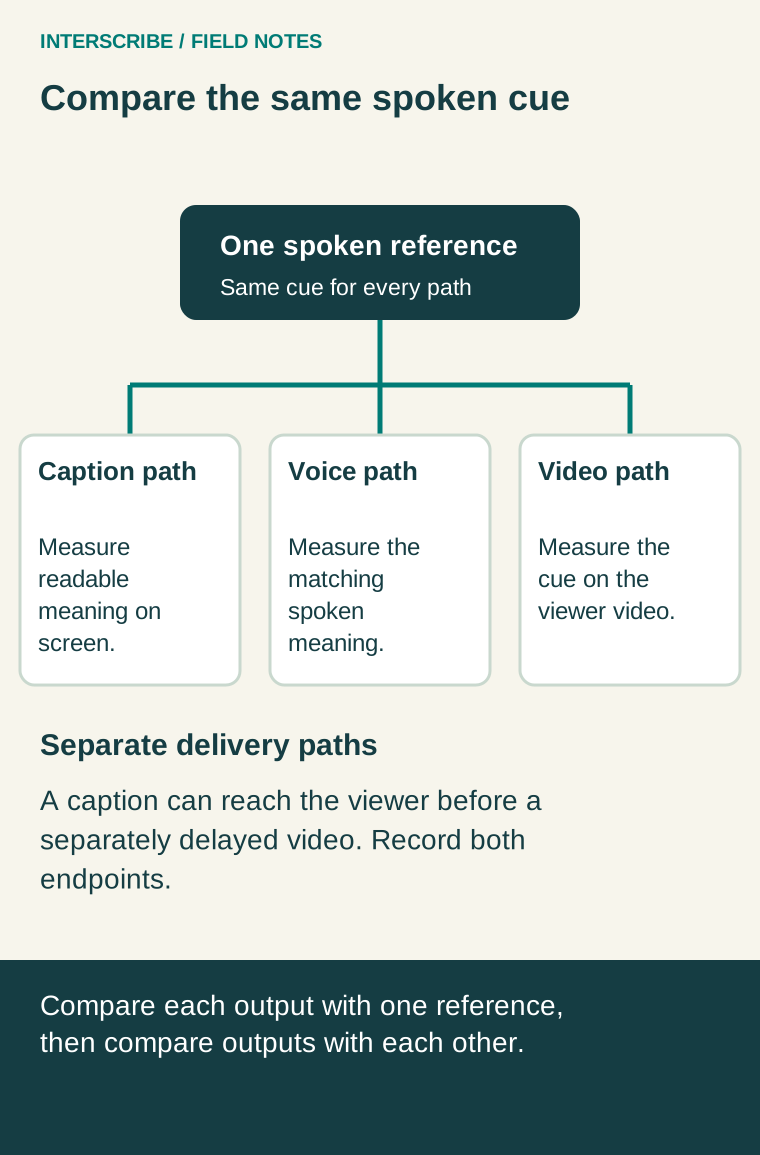
| Video speech to separate captions | Alignment of two delivery paths at the viewer | Which path should be changed without further measurement |
The monitoring guide explains the product's gauges. The Agents page guide explains sending status and last contact; that status is not a latency measurement. Check the controls available in your deployed version during rehearsal.
A green connection indicator is useful evidence about one connection. It is not a reason to dismiss a guest who cannot follow the session.
Build a repeatable rehearsal sample
Choose several short, natural phrases that resemble the event: a name, an instruction, a number, and a question. Avoid using a single unusually easy sentence as the entire test. Include the actual source and target languages, speaker microphone, attendee browser, and network path.
Define the start and endpoint in writing. For example: “start when the speaker finishes the phrase; stop when the complete matching meaning is readable on the attendee screen.” That produces a different number from measuring first sound to first partial word. Either observation can help, but do not combine them in one average.
For translated speech, ask a competent listener to identify the corresponding meaning. Languages need not preserve the source word order. A timer stopped at the first sound might reward a fast output that has not yet delivered the important instruction.
Use a synthetic rehearsal and a recording that can capture the reference cue and destination together, where permitted. Separate device clocks are not automatically synchronized. A handheld stopwatch can provide an estimate, but record the method and its limits instead of reporting false precision. Keep participant information out of a support sample unless sharing it is authorized.
Repeat the sample, record every result, and note interruptions. Summarize the middle value and range rather than hiding occasional stalls in one average. Five rehearsal observations are a starting point, not a service benchmark or a prediction of the busiest audience conditions.
A fictional rehearsal: captions appear before the video
A fictional hybrid workshop tests a phrase using a common recording reference. In five runs, the complete caption arrives 2.8, 3.1, 3.0, 3.4 and 3.2 seconds after the end of the spoken phrase. The median is 3.1 seconds and the range is 2.8–3.4 seconds. These are invented training numbers, not InterScribe performance claims.
On one run, the matching caption appears three seconds after the original cue. The home viewer's video reaches that cue eight seconds after the original. The caption therefore leads the video by five seconds. The viewer reasonably reports that they cannot match the text to the speaker, even though slowing down or restarting translation would not identify the underlying cause.
The team records both paths, then rehearses the supported synchronization options with its video operator. It does not apply an improvised delay to the live event. A room attendee who hears the original loudspeakers has different timing needs from the home viewer.
The practical decision is whether each audience can follow and participate using its actual combination of audio, video and text. W3C's Synchronization Accessibility User Requirements discusses this relationship across media; it is useful background, not a platform-specific performance guarantee.
Copy this measurement sheet
Create one row per observation. Keep the raw samples alongside your summary.
| Field | What to record |
|---|---|
| Session and time | Rehearsal identifier, clock time and time zone |
| Audience path | In-room audio, remote video, separate captions, or translated voice |
| Source and output | Microphone/input, source language, target language and selected output |
| Device and connection | Browser/device and actual network path, without passwords |
| Timing definition | Exact cue and endpoint; first partial text or complete meaning |
| Method | Common-reference recording or manual estimate; known uncertainty |
| Samples | Each observed delay, missing output, revision or interruption |
| Meaning and participation | Was the instruction correct? Could the guest answer before the host moved on? |
| Decision | Accept for this rehearsal, investigate a named path, or arrange another support method |
| Owner and retest | Person responsible, one proposed change and next rehearsal time |
Agree the decision criteria with the people using the service. A presentation and a rapid audience exchange have different interaction demands. Do not turn an arbitrary number from an old blog post into a contractual acceptance threshold.
During the event: observe, isolate, then coordinate
- Record scope. Note the time, affected language/output and attendee path. Is one guest affected, one channel, or every output? Check a second device only if one is available without abandoning the live operator role.
- Check the source and status. Confirm that the intended speech is reaching the system and inspect the relevant channel and connection indicators. Do not confuse headphone monitoring with audience delivery.
- Use the matching troubleshooting guidance. The late-caption guide distinguishes a growing channel backlog from a Console computer connection problem. Record what changed rather than guessing that all languages should be removed.
- Coordinate disruptive actions. A supported AI voice channel restart interrupts that channel and discards its backlog; it is not a generic caption or whole-session remedy. Confirm the affected output, notify the host, and use an agreed fallback or pause before taking an action that removes access. Follow the current product guide and support advice.
- Preserve evidence and reassess. Share the session reference, time zone, observed output and timing method through the approved support channel. After a change, repeat the same comparison before declaring recovery.
Run bandwidth-intensive connection tests during rehearsal rather than adding traffic during an incident. Avoid restarting the whole session, changing the audio route or removing a needed language merely to see what happens. Those actions can turn one delayed output into a wider interruption.
Make the host part of the solution
Technical measurements do not tell the host when a guest has finished reading or listening. Rehearse deliberate pauses after important instructions and before closing questions. Ask a participant using the intended support to try the response path. Record whether they can participate, not only whether text appears.
Leave rehearsal with three things: a defined timing comparison, an owner for each delivery path, and a response plan the host understands. That is more useful during a live event than a single unexplained latency number.